From wireless-shy to a wireless high
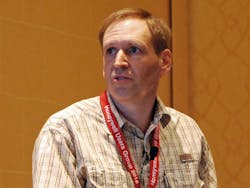

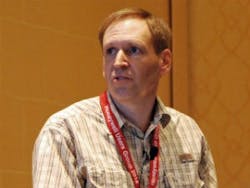
“The mobile library is not intended to mimic every console display.” Nova Chemicals’ Cilius van der Merwe told the story of his facility’s Mobile Operator interface deployment at this week’s Honeywell Users Group 2018 meeting in San Antonio, Texas.
What a difference a decade makes.In 2008, Nova Chemicals’ facility in Joffre, Canada, was merely dipping its proverbial toe into the icy waters of wireless connectivity. It started exploring wireless instrumentation for new projects where it had no existing wiring and for applications in some remote locations.
“In 2011, we expanded our vision, looking at other applications,” said Cilius van der Merwe, process control engineer at Nova’s Alberta plant, which produces ethylene and polyethylene. “In 2013, we kicked off a major expansion to add another production line, and we justified wireless. Since we were putting in infrastructure, we did a little bit of future focus and put something in to enable other opportunities such as tablets later on.”
Six months ago, Nova rolled out its Mobile Operator infrastructure and registered more than 400 field-initiated sessions over a two-week period by the latter half of May. “The proof of concept was beneficial,” van der Merwe explained during his presentation at the Honeywell Users Group 2018 conference this week in San Antonio, Texas. “We’re in the process of quantifying the benefits now so we can cookie-cutter this into other locations in the future. We’re measuring things such as how much time we save and improvements in error rates.”
Wireless infrastructure
The Mobile Operator infrastructure includes Panasonic Toughpad wireless tablet PCs, five Cisco Aironet 1552 outdoor wireless access points and Honeywell Flex Stations. It uses the Honeywell DCS wireless systems architecture. “Everything on the Flex Stations is configured, so it’s really just a thin client,” explained van der Merwe. “We knew there would be benefits to the tablet devices, including a reduction in radio traffic between the field and the control room, as well as reduced risk of miscommunication.”
It also provides instant feedback to field users who can view operating procedures and access documentation for troubleshooting automation equipment.
“We have a mix of old technologies, including manual processes like swinging a mallet and then radioing the central control to do some next step,” said van der Merwe. “Initially we targeted field operators as the main users for troubleshooting automation equipment and looking up standard operating procedures. Also, maintenance technicians could use it for calibrating field instrumentation or troubleshooting. The next phase will be project teams loading up the displays with information for the loops we’re commissioning.”
Van der Merwe wanted to make the user-interface (UI) design as low-cost as possible. Using Abnormal Situation Management (ASM) design principles, including gray scale and alarm colors, trending and tab navigation, information is designed to fit on one 10-inch display screen.
“We targeted read-and-write, not a view-only tool,” explained van der Merwe. “And we designed the UI to accommodate touch. There’s a keyboard that pops up for entering tag names and an oversized numeric keypad for analog data entry. The screens are capacitive touch, but operators typically have to take off their gloves to enter data. There’s also a stylus. But most of the input operations are done indoors.”
The displays were designed to be very task-oriented. “The mobile library is not intended to mimic every console display,” explained van der Merwe. “And there’s no requirement to display every Honeywell DCS tag or alarm.”
Future-proofed design
One of the primary intents was to future-proof the design. When display options were being considered, there were no de facto standards for tablets. The device that was purchased, the Panasonic Toughpad FZ-G1, has a 1920 x 1200 pixel, 19:10 display. The average width of the human finger is 16-22 mm, and Microsoft touch-display research and UI guidelines dictate the ideal touch target to be 9 x 9 mm or 15 x7 mm, with padding between targets set at greater than 2 mm. Nova’s HMI library shapes are designed for 24-inch monitors at 92 ppi, so they had to be scaled for 10-inch displays and then have font sizes increased from 12 to 16.
“Space is at a premium compared to 24-inch monitors,” said van der Merwe. The main display focus was on content to support a task, rather than on process-flow diagrams. And links to documentation were provided. To save space, a numeric keypad pops up automatically when it’s required for input. “We wanted to keep the design simple,” explained van der Merwe. “Otherwise operators would not use it. We knew we had a single window for display. We designed with very user-specific profiles.
“We wanted operations to really adopt this and love this from the start,” he continued. “I took the initial design to them and got input. They requested some additional data input steps. They identified opportunities, such as improvements to procedures that require a mix of field and panel operation; field tasks that would benefit from Honeywell DCS monitoring; commissioning; and troubleshooting. The main display layout was also based on operator sketches.”
When the project was rolled out, operators gave input on friction points. “We’ve made lots of little tweaks, including layout improvements; zero-friction remote login; additional shortcuts to tablet utilities such as the calculator, Wi-Fi and battery indicators; and elimination of battery-saving hibernation,” said van der Merwe. “The batteries are good for 12 hours, and the operator shifts are only eight hours. Hibernation was a problem because, each time it woke up, the Toughpad had to reconnect to the network, which took about a minute.”
The largest complaint from operators has been loss of connection, which will be corrected by improvements to Wi-Fi coverage planned for this coming summer. “We have five access points now, and we’re moving them around to try to improve that,” said van der Merwe. “We’re thinking about adding more.”
About the Author
Mike Bacidore
Mike Bacidore
 Leaders Logo
Leaders relevant to this article: